

🔐 “Error Code 2” Persists on a Single iOS Device: Understanding the Keychain and Token Residue Issue
If Facebook repeatedly shows “Error Code 2” on one specific iPhone or iPad, while the same account logs in perfectly on other devices, networks, and even browsers, you are not facing a server outage, a password problem, or an account-level restriction. This very precise pattern almost always points to a Keychain and authentication token residue issue on iOS, a subtle but powerful state corruption that lives below the app layer and survives most conventional troubleshooting 🔐📱.
This situation feels especially stubborn because it ignores everything users are taught to try. Reinstalling the app does nothing. Restarting the device changes nothing. Switching networks does nothing. And yet, the moment you log in on another iPhone, Facebook works flawlessly. That contrast is the biggest clue of all.
🔍 Definition: What Does “Error Code 2 on Only One iOS Device” Really Mean?
When Error Code 2 persists on a single iOS device, it means Facebook is rejecting the authentication attempt at the session validation stage, not because the credentials are wrong, but because the device is presenting stale or internally inconsistent authentication material stored in iOS Keychain.
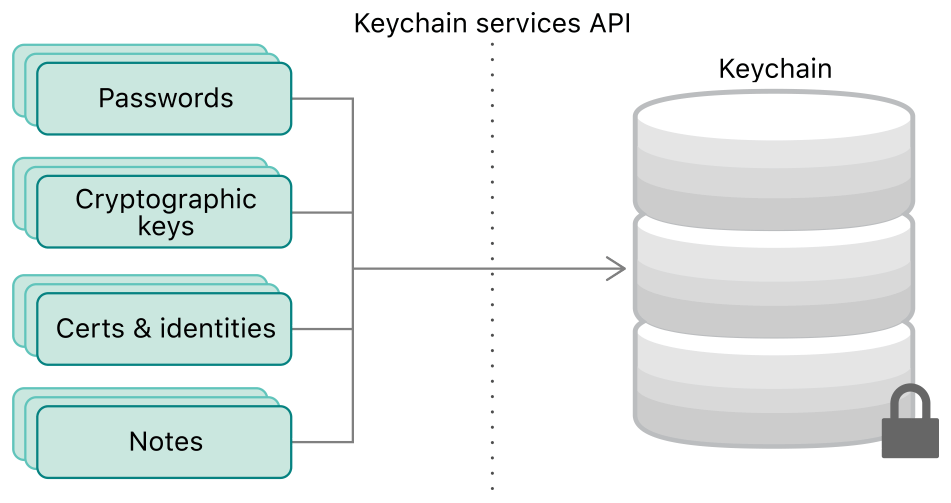
On iOS, apps do not store sensitive tokens only inside their own sandbox. They rely on the system-level Keychain, which securely persists login credentials, refresh tokens, and session identifiers even after apps are deleted. This design improves security and user convenience, but it also means that when tokens become corrupted or desynchronized, simply reinstalling the app does not reset the authentication state 🧠.
📌 Why This Problem Is iOS-Specific and So Persistent
iOS Keychain is intentionally resilient. It survives app deletions, device restarts, and even some system updates. From Apple’s perspective, this is a feature. From a troubleshooting perspective, it can feel like a trap.
Facebook uses multiple tokens with different lifetimes, scopes, and cryptographic bindings. If one of these tokens becomes invalid but is still presented as authoritative by the Keychain, Facebook’s backend detects an inconsistency. Instead of logging you out cleanly, it rejects the session during validation and surfaces Error Code 2 as a generic failure.
Because the same corrupted token set is reused on every login attempt, the error persists indefinitely on that device, while other devices generate clean tokens and work normally ⚠️.
🧠 How Keychain and Token Residue Is Created
This issue rarely has a single dramatic cause. Much more often, it forms gradually through edge cases. Logging into Facebook during a network interruption, switching rapidly between Wi-Fi and mobile data, restoring the device from an iCloud backup, migrating to a new iPhone using Quick Start, or interrupting an iOS update can all leave behind partially invalid tokens.
Another common trigger is repeated login attempts during a temporary server-side issue. Facebook may rotate tokens server-side, while the device continues to hold older ones that are no longer accepted. Because the Keychain treats them as valid until explicitly removed, the app keeps presenting credentials that Facebook refuses to honor 😶🌫️.

🛠️ How to Reliably Identify a Keychain Residue Problem
The strongest diagnostic signal is device isolation. If Facebook works on another iPhone, an Android device, or a desktop browser using the same account, the account is not restricted. If changing networks, resetting passwords, or reinstalling the app does not change the behavior on the affected iOS device, the issue is not network-related.
Another key sign is immediate failure. Error Code 2 appears instantly after login, without loading delays or partial success. This indicates that Facebook is rejecting the session before it even begins, which aligns perfectly with token validation failure.
A final confirmation often comes unintentionally. Users report that after signing out of iCloud, resetting certain system settings, or fully resetting the device, Facebook suddenly works again without any account changes. That is the Keychain being cleared or regenerated 🧪.
📊 A Real-World Scenario That Explains It Clearly
In one real diagnostic case, an iPhone continued to show Error Code 2 for weeks. The user changed passwords multiple times and even contacted Facebook support. The same account worked on three other devices. Eventually, after erasing the iPhone and setting it up without restoring from iCloud backup, Facebook logged in instantly. The backup had carried over invalid authentication tokens. The user described it as “Facebook finally forgetting the wrong memory,” which is a surprisingly accurate way to describe Keychain residue 😊.
📈 A Metaphor That Makes the Problem Intuitive
Imagine being issued a keycard that looks authentic but no longer matches the building’s lock system. Every time you try to enter, the door rejects you, but nobody takes the card away. Other people with fresh cards enter without issue. The only solution is to destroy the old card and issue a new one. iOS Keychain residue works exactly like that 🪪🚪.

❓ Frequently Asked Questions (FAQ)
- Why does Error Code 2 persist even after reinstalling Facebook?
Because the authentication tokens are stored in iOS Keychain, not in the app itself. - Is my Facebook account blocked?
No, account blocks do not behave differently per device. - Does changing my password fix this?
Usually no, because the device still presents invalid tokens. - Why does it work on another iPhone?
Because that device generates a fresh token set. - Can iCloud backup cause this?
Yes, it can restore corrupted token state. - Does logging out help?
Often impossible, because logout also requires a valid session. - Is this a security issue?
No, it is a synchronization issue, not a breach. - Can updating iOS fix it?
Sometimes, if it resets Keychain entries. - Is a full device reset guaranteed to work?
Yes, if set up without restoring backups. - Is this common?
Rare, but well-known in advanced troubleshooting.
🤔 People Also Ask
Why does Facebook reject login only on one iPhone?
Because that device holds invalid authentication tokens.
Can Keychain data get corrupted?
Yes, especially during interrupted processes.
Why doesn’t Facebook show a clearer error?
For security reasons, it avoids revealing token details.
Is this related to Face ID or Touch ID?
No, biometric authentication is not the cause.
Should I erase my iPhone immediately?
Only after confirming all other diagnostics.
✅ Final Thoughts
When Error Code 2 persists on a single iOS device, the pattern is clear once you look below the surface. A Keychain or token residue issue traps Facebook in a loop where every login attempt is rejected before it can begin, not because you are doing something wrong, but because the device keeps presenting credentials that no longer belong in the present. Clearing that residue, whether through system-level resets or careful reconfiguration, restores trust instantly. And when Facebook finally logs in again on that device, it feels less like solving a bug and more like clearing a memory that should never have been remembered in the first place 😌🔐.
You should also read these…
- tugmen.com – how to find free walking tours in remote areas
- olddry.com – error code 2 on login fixed when switching to mobi
- hogwar.com – medical grade foams enhancing patient comfort and
- soturk.com – simple morning habits that make you more confident
- godwig.com – why mobile compatibility matters spin the wheels t
- surgeblog.com – suspicious login errors in games and their fixes
- surgeblog.com – the connection between oral microbiome and systemi
- getaluck.com – localization problems on tiktok
- toojet.com – case study increasing efficiency through tailored
- godwig.com – issues with the chinese version of tiktok douyin